
Free Live Workshop for Project Leaders
Using AI to Prep for Leadership Meetings
A free 60-minute workshop, live on Zoom, where I'll show you how to set up your AI tool so that it builds the update for you, and your prep time goes into developing the recommendations leadership wants to hear.
Next session: Tuesday, November 17 · 12:00 to 1:00 PM ET · Live on Zoom
Registration for November 17 opens soon. Download the free Stakeholder Brief and I'll email you when it does.
Get the Free Stakeholder Brief
Where Your Prep Time Goes
The most important slide in a leadership meeting deck is usually the one that gets the least preparation time. It's the one with your recommendations on it, and it usually gets built last, with whatever time is left after the update slides are done.
The update takes the time because the information behind it is spread out. Status lives in a tracker, the latest decisions are in last week's meeting notes, a vendor delay is buried in an email thread, and the read on why a stakeholder has stopped weighing in usually lives only in the project leader's head. Pulling all of that into something leadership can follow is real work, and it starts over before every meeting.
By the time the update is ready, the recommendation gets written in a hurry, even though it's the slide leadership is waiting to hear.
Why AI Drafts Sound Generic
Ask an AI tool to draft a status update with no background, and what comes back tends to read like a press release written by someone who has never seen the project.
That happens because the tool starts every conversation knowing nothing about your organization, your project or the people involved. It's a bit like asking a smart new hire to write the board update on their first day. Giving it that background is a skill you can learn, and once it's set up, it's there for every meeting after.
One Request, Two Answers
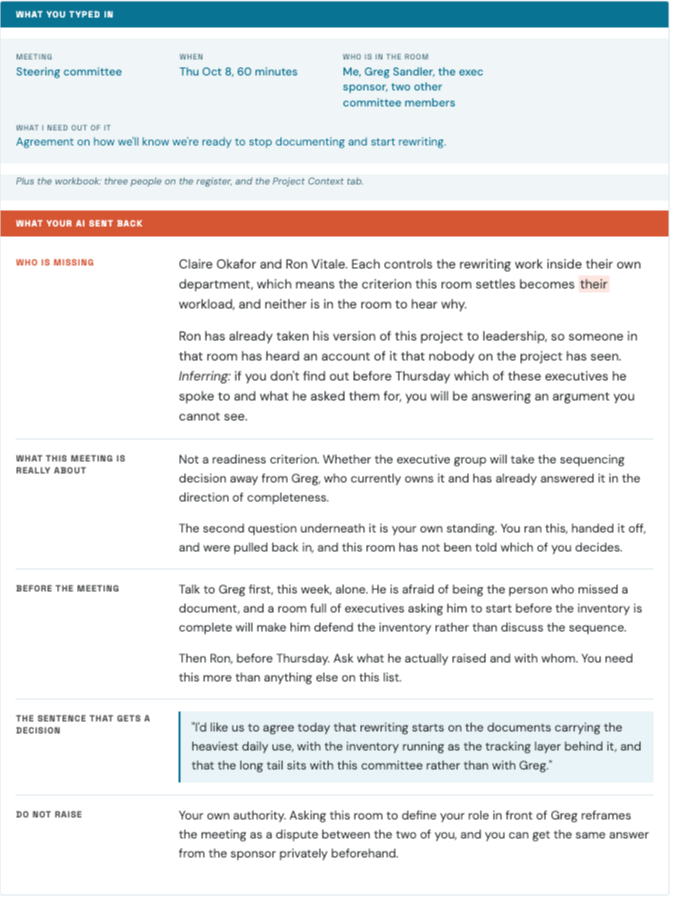
During the workshop I'll send the same request to an AI tool twice. The first time, it knows nothing about the project. The second time, it has the project's current state and a read on the people involved. You'll see both answers side by side and be able to point to the exact background that made the second one usable.
The demo project is realistic and a little messy on purpose, the way real projects tend to be.
What We'll Cover In 60 Minutes
The Slide That Gets Built Last
Why the update takes up most of the prep time, and why the recommendation slide ends up with whatever time is left.
The Setup, Built Live
On a realistic project, I'll give an AI tool the background it needs about the work and the people, then ask it to build the leadership update. Then we'll spend the saved time on the recommendation slide.
Your Projects, Your Questions
Open time for questions about using AI in the projects you lead.
Where To Go From Here
A few minutes on ways to keep working with me after the workshop, for anyone who wants more help with the projects they lead.
I'll demo in Claude, but the same setup works in whatever AI tool your company lets you use.
What You'll Take Away
- A setup you can copy for your leadership updates, the first piece of a larger system.
- A clear picture, from watching the two versions side by side, of what changes in the update once that background is in place.
- More of your prep time for the recommendation slide, and a way to test it with the same setup before the meeting.
- The 15-Minute Stakeholder Brief, a workbook and set of prompts that give your AI tool a read on the people involved in your project, sent as soon as you register.
Who Should Attend
- You lead a project with stakeholders across several teams, or you’re about to start one.
- You regularly provide updates on your projects, and building those updates takes more of your prep time than you'd like.
- You've tried using AI on your projects, and the answers came back generic.
- Your company allows at least one AI tool, or you can use one on your own.
BONUS: Register and get The 15-Minute Stakeholder Brief
When you register, I'll send you The 15-Minute Stakeholder Brief: a workbook and three prompts that give your AI tool a read on the people involved in your project, including what each person cares about and what gets you a yes from them.
It works on its own, so you can use it on a current project whenever you like.
What Others Have Said
Matthew Smith
Superintendent, CD Barnes Construction
"It was great having you as my professor and mentor. I appreciate the effort you put in and all of the great information you shared. I have an interview set up for a PM position at CD Barnes Construction. The course is paying off!"
Victoria Murillo
Senior Events Program Coordinator, University of Texas at Austin
"Jeff is an amazing teacher, better than most of the professors I had in college. As an educator myself, I noticed how he ran his sessions. I came from theater and dance with no background in business, and he made everything understandable at the level I needed. I really appreciated his support throughout the course."

About Jeff Maldavir
I'm Jeff Maldavir, founder of Shack Consulting. I've spent more than twenty years leading complex, cross-functional initiatives for organizations including Hyatt, Reebok, JP Morgan Chase, Girl Scouts of the USA, and Blood Cancer United, where I recently helped lead a multi-year national rebrand. I've also taught project management to more than 1,600 learners, so I know the difference between what people actually use on the job and what only sounds good in a class.
For most of those years, getting ready for a leadership meeting meant hours of pulling the update together and very little time left for the part leadership cared about most, which was what I thought we should do next. Once I set up AI to know my project and the people on it, the update started taking me about fifteen minutes. In this workshop I'll walk you through that setup step by step, on a realistic project.
Tuesday, November 17
12:00 to 1:00 PM ET

Live On Zoom

Free with workshop registration: The 15-Minute Stakeholder Brief
Frequently Asked Questions
Do I need to be technical?
Which AI tool do I need?
Can I use this with confidential project information?
Do I need to bring anything to the workshop?
Why is it free?
Walk into every project update with a recommendation you've had time to sharpen
Come see how to let AI handle most of the update, so you can put your time into the recommendation.
Get the Free Stakeholder BriefNext session: Tuesday, November 17 · 12:00 to 1:00 PM ET · Registration opens soon
Privacy Policy | Contact Us | Shack Consulting
© 2026 Shack Consulting LLC. All rights reserved.